

This guide covers connecting a KrakenSDR 5-channel phase-coherent receiver to a RemoteRF server or host over USB. Support is included in the built-in krakensdr schema.
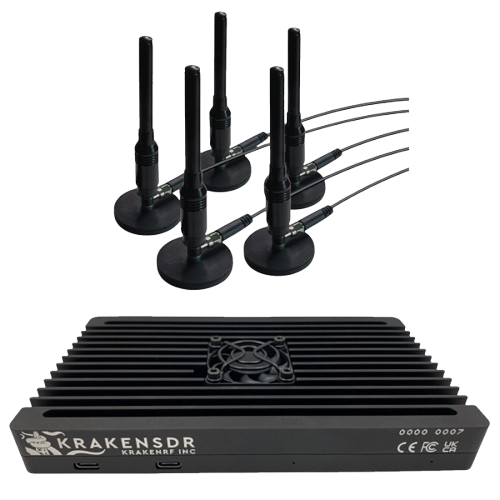
Overview
RemoteRF supports the KrakenSDR through the built-in krakensdr schema. The KrakenSDR combines five RTL2832U / R820T2 tuners sharing a common master clock oscillator with an internal calibration noise source and RF switch controlled via Channel 0 GPIO 0. Over USB, it enumerates as five RTL-SDR interfaces with factory serial numbers 1000, 1001, 1002, 1003, and 1004.
device_type:krakensdr- Transport: USB 2.0/3.0 Type-C data port (
DATA), plus separate 5 V / 2.4 A USB-C power port (PWR) - Required identifiers: Ordered list of 5 tuner serial numbers (
serials: ["1000", "1001", "1002", "1003", "1004"])
1. Install Dependencies and Detect All 5 Tuners
Install librtlsdr and pyrtlsdr
Install the native rtl-sdr tools, development library, and Python bindings on the server or host machine:
sudo apt update
sudo apt install -y rtl-sdr librtlsdr-dev
pip install pyrtlsdr numpy
Blacklist the Linux DVB-T Kernel Driver
Prevent the Linux kernel from claiming the five RTL2832U tuners as digital TV receivers:
echo -e "blacklist dvb_usb_rtl28xxu\nblacklist rtl2832\nblacklist rtl2830" | sudo tee /etc/modprobe.d/blacklist-rtlsdr.conf
sudo modprobe -r dvb_usb_rtl28xxu rtl2832 rtl2830 2>/dev/null || true
sudo udevadm control --reload-rules && sudo udevadm trigger
Verify USB Enumeration (rtl_test -t)
Connect both the PWR (5 V / 2.4 A+) and DATA USB-C cables on the KrakenSDR, then run rtl_test -t to confirm all five tuners (1000 through 1004) are detected:
Found 5 device(s):
  0:  Realtek, RTL2838UHIDIR, SN: 1000
  1:  Realtek, RTL2838UHIDIR, SN: 1001
  2:  Realtek, RTL2838UHIDIR, SN: 1002
  3:  Realtek, RTL2838UHIDIR, SN: 1003
  4:  Realtek, RTL2838UHIDIR, SN: 1004
Power Supply Warning: Always power the KrakenSDR through its dedicated
PWRUSB-C port using a 5 V / 2.5 A+ supply. Relying on host USB bus power alone can cause one or more of the five R820T2 tuners to brown out or drop samples during 5-channel streaming.
2. Configure devices.yml
The krakensdr schema is included out of the box. Add the KrakenSDR entry to ~/.config/remoterf/devices.yml on the server (or ~/.config/remoterf/host/devices.yml on a host):
devices:
  - device_id: 10
    device_type: krakensdr
    name: KrakenSDR
    init:
      serials:
        - "1000"
        - "1001"
        - "1002"
        - "1003"
- "1004"device_id: Unique integer across the entire RemoteRF deployment.device_type: Must bekrakensdr.init.serials: Ordered list of the five RTL2832U USB serial strings ("1000"must be first, as Channel 0 controls the internal calibration noise source GPIO).
3. Verification
- Start or restart the RemoteRF service (
serverrf -son the server, orhostrf -son a host). - Confirm that
KrakenSDRtransitions toONLINEin the server status table. - Reserve the device and run a quick 5-channel verification from a client:
from remoterf.drivers import ensure_driver

TOKEN = "KrakenSDR@ucla"
ensure_driver(token=TOKEN)

from remoterf.drivers.krakensdr import KrakenSDR

sdr = KrakenSDR(token=TOKEN)
sdr.sample_rate = 2.048e6
sdr.center_freq = 100.0e6
sdr.gain = 29.7
samples = sdr.read_samples(4096)
print("Captured 5-channel array shape:", samples.shape)
Next Steps
- See the KrakenSDR Client Guide for 5-channel spectrum plotting and phase/delay calibration examples.
- Return to Device Setup Overview.