RemoteRF Deployment
Deployment, setup, and operational documentation for RemoteRF servers, hosts, and SDRs.
This documentation is for the deployment and server-side management of RemoteRF. For documentation on how to use RemoteRF once it has been set up, please see this page.
Overview
This documentation provides guidance for researchers and university instructors who wish to deploy and manage a RemoteRF instance in their research lab on their university’s campus.
Hardware Requirements
For a minimal RemoteRF setup, the only hardware you will need is:
- A Linux-based computer, such as a simple desktop computer. We recommend Ubuntu 24.04 LTS, but other distributions should also work, though they have not been extensively tested.
- At least one SDR of your choice. For first-timers, we suggest starting with two ADALM-PLUTO SDRs. You can always add more (and other) SDRs later.
Definitions
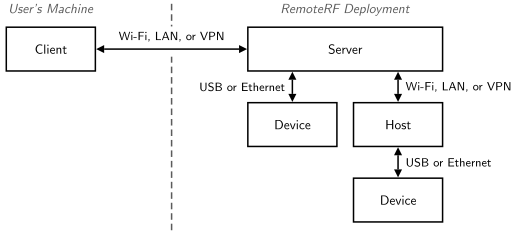
As summarized below, RemoteF consists of four main components, each of which serves a specific purpose in the overall platform. These four components will be referred to as “server”, “host”, “device”, and “client” throughout this documentation.
| Term | What it is | Why it exists |
|---|---|---|
| Server | The central RemoteRF component that manages reservations and access to SDRs. | Provides centralized control of SDRs, manages reservations, and user accounts. |
| Host | A lightweight computer that connects SDRs to a RemoteRF server over Wi-Fi, LAN, or VPN. | Facilitates the distributed deployment of SDRs to create large-scale testbeds that span entire buildings or campuses. |
| Device | An SDR physically connected to a RemoteRF server or RemoteRF host. | Allows users to conduct wireless experiments for educational or research purposes. |
| Client | A user's personal computer installed with the RemoteRF command line interface and Python library. | Provides a user with access to the SDRs connected to a RemoteRF server to conduct experiments remotely. |
In a simple deployment, one server may have a handful of SDRs connected via a wired connection, such as USB, without the need for hosts. In a larger deployment, hosts can be used so that SDRs can be distributed across a room, building, or entire campus, while still being controlled and managed by a single server.