
ADALM-PLUTO MIMO Device Guide
Use this guide to attach an ADALM-PLUTO configured for AD9361 2R2T operation through RemoteRF's separate built-in MIMO driver.
ADALM-PLUTO MIMO is a separate native RemoteRF device type. It uses the packaged adalm_pluto_mimo schema, opens the radio through pyadi-iio's adi.ad9361 interface, and enables RX and TX channels 0 and 1 by default.
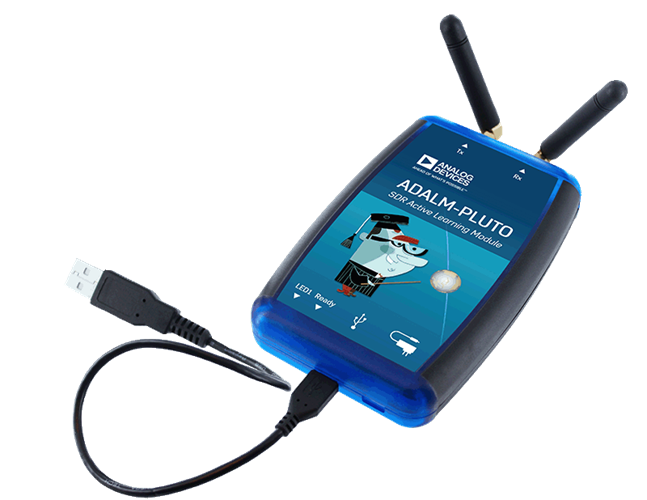
Overview
RemoteRF treats standard Pluto and Pluto MIMO as two distinct native drivers:
- Use
device_type: adalm_plutoand the generatedPlutoclient for normal single-channel Pluto operation. - Use
device_type: adalm_pluto_mimoand the generatedPlutoMIMOclient when the device is prepared for two receive and two transmit channels.
The MIMO schema inherits the normal Pluto tuning, bandwidth, buffer, DDS, RX, and TX interface. It adds channel-selection controls plus channel 1 receive gain mode, RX hardware gain, and TX hardware gain.
2r2t operation before registering it as adalm_pluto_mimo.
Prepare MIMO Mode
Analog Devices documents the Pluto boot configuration used to enable AD9361-compatible 2R2T operation. Follow the official procedure appropriate for your hardware revision, then reboot the Pluto and verify the saved boot values before continuing.
Use the ordinary ADALM-PLUTO tutorial instead if the local AD9361 interface does not expose both complex channel indexes. A RemoteRF manifest setting cannot compensate for a device that is still operating as a single-channel Pluto.
Install and Detect
Install the dependencies on the machine that physically owns the Pluto MIMO. Use remoterf-server for a server-attached radio or remoterf-host for a host-attached radio.
Install Pluto Dependencies
The base RemoteRF package already installs pyadi-iio. Install libiio and its tools on the machine that runs the RemoteRF process.
conda install -y libiio pylibiio libusb
sudo apt-get install -y libiio-utilsFind the Serial and USB URI
Confirm that libiio can discover the device without elevated privileges.
iio_info -s[usb:1.2.3]. Save the serial for devices.yml and the USB URI for the local two-channel check.
Check Both Channels Locally
Replace the example URI with the USB URI reported by iio_info -s.
python - <<'PY'
import adi

sdr = adi.ad9361("usb:1.2.3")
sdr.rx_enabled_channels = [0, 1]
sdr.tx_enabled_channels = [0, 1]
print("RX channels:", sdr.rx_enabled_channels)
print("TX channels:", sdr.tx_enabled_channels)
PY[0, 1]. Resolve firmware, hardware, libiio, or permissions problems locally before starting RemoteRF.
Manifest Example
Save this file on the machine the Pluto MIMO is physically attached to. For a Pluto MIMO attached to the main RemoteRF server, place it at ~/.config/remoterf/devices.yml. For a Pluto MIMO attached to a RemoteRF host, place it at ~/.config/remoterf/host/devices.yml.
Below is an example devices.yml file for a Pluto MIMO:
devices:
  - device_id: 2
    device_type: adalm_pluto_mimo
    name: Pluto MIMO Bench
    init:
      serial: "104473f6"
      rx_enabled_channels: [0, 1]
      tx_enabled_channels: [0, 1]
Alternatively, for a Pluto MIMO attached directly to the main RemoteRF server, create the same YAML entry through the CLI:
serverrf --device --add --pluto-mimo "2:Pluto MIMO Bench:104473f6"
serverrf --device --show
For a device attached to a RemoteRF Host, use hostrf instead of serverrf for supported device-add commands.
Verify Two Channels
After reserving the device, refresh the generated client and perform a short receive:
from remoterf.drivers import ensure_driver

ensure_driver(token=token)
from remoterf.drivers.adalm_pluto_mimo import PlutoMIMO

sdr = PlutoMIMO(token)
sdr.rx_enabled_channels = [0, 1]
sdr.rx_buffer_size = 4096
channel_0, channel_1 = sdr.rx()

print(channel_0.shape, channel_1.shape)
With two complex receive channels enabled, pyadi-iio returns one array per channel. Use the same ordering for two-channel transmit data: one complex array for channel 0 and one for channel 1.
Troubleshooting:
if the device opens with adi.Pluto but not adi.ad9361, or channel index 1 is rejected, return to the MIMO prerequisite and local check. If local two-channel access works but RemoteRF does not connect, confirm the serial and the exact adalm_pluto_mimo device type, then restart the owning RemoteRF process.