

This guide covers selecting software-defined radios for university courses, configuring cabled loopback and over-the-air (OTA) radios with appropriate attenuation and filtering, and determining how many SDRs your class size requires.
Classroom Hardware
A classroom RemoteRF deployment requires only a standard Linux computer and a small bank of software-defined radios:
- Server Computer: A standard desktop workstation or rack server running Linux (Ubuntu 24.04 LTS recommended). Because students run all signal processing and plotting on their own laptops, the RemoteRF server only orchestrates reservations and streams IQ buffers—it does not need a high-end CPU or GPU.
- Software-Defined Radios: For most undergraduate and graduate communications and DSP courses, we recommend starting with a pool of ADALM-PLUTO ↗ (“Pluto”) transceivers available from distributors such as DigiKey or Mouser. Courses covering MIMO, wideband cellular standards, or passive reception can also mix in ADALM-PLUTO MIMO, USRP 2901, USRP B205-mini, USRP N210, HackRF One, or RTL-SDR units on the same server.
For step-by-step software installation on the server machine, see the Server Deployment Guide.
Loopback vs. Over-the-Air Setups
We strongly recommend dividing your classroom SDR pool into two complementary RF configurations: cabled loopback and over-the-air (OTA).
1. Cabled Loopback SDRs
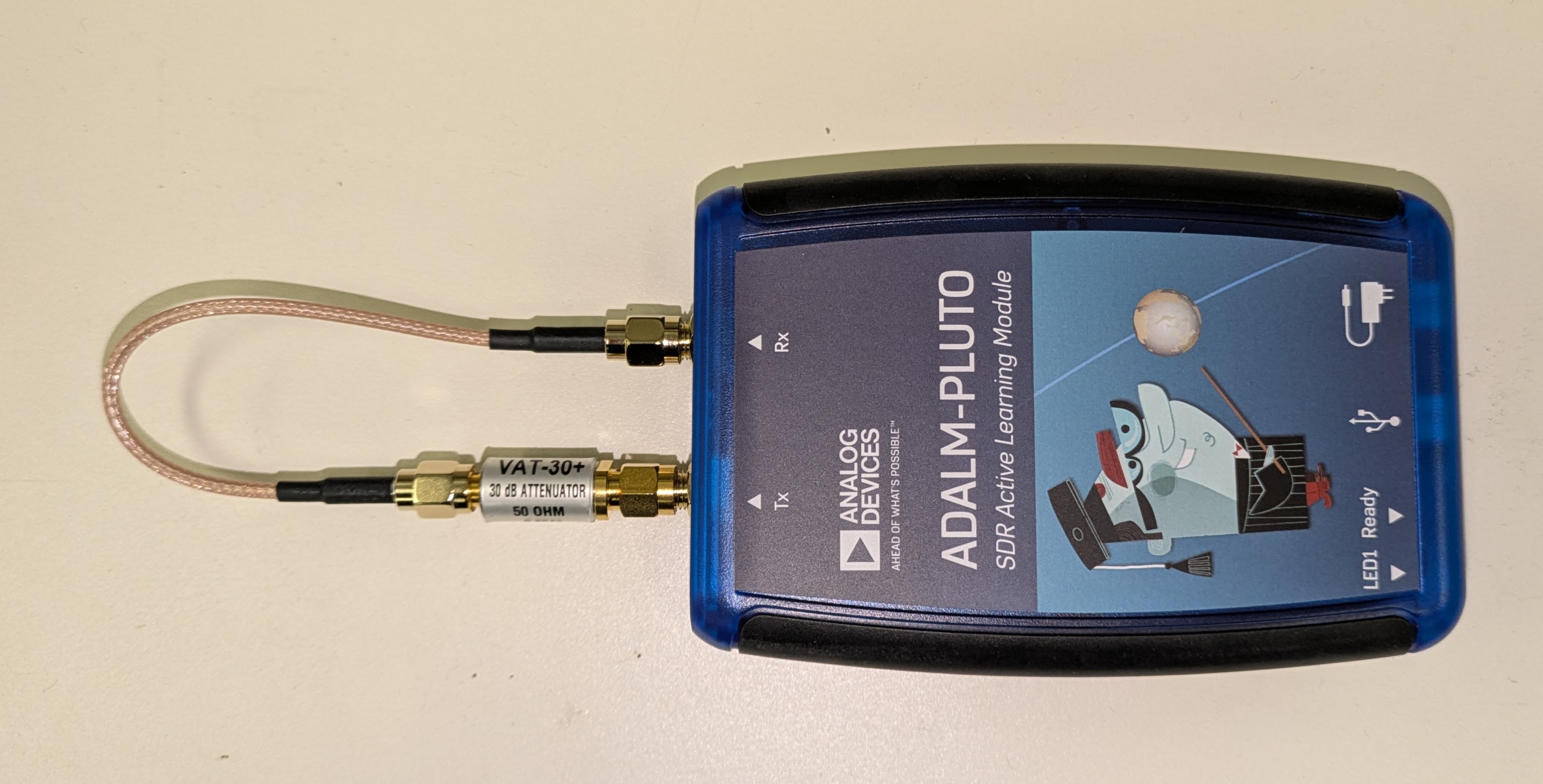
To aid in student debugging and initial lab development, configure a few SDRs in a cabled loopback fashion, where an SMA coaxial cable connects the transmit (TX) port of each SDR directly to its own receive (RX) port through an inline 30 dB SMA attenuator to protect the receiver front-end. You can purchase a kit of SMA attenuators on Amazon, for example.
If desired, you can also directly connect one SDR’s transmit port to another SDR’s receive port using an SMA cable with 30 dB attenuation, allowing students to verify cross-device communication (and Carrier Frequency Offset) across a controlled, interference-free link before attempting over-the-air transmissions. Instructors can also assemble multi-tap cabled loopback channels (using SMA power splitters/combiners and delay lines of different cable lengths) to introduce repeatable frequency selectivity and inter-symbol interference (ISI) for equalization and OFDM labs.
2. Over-the-Air (OTA) SDRs
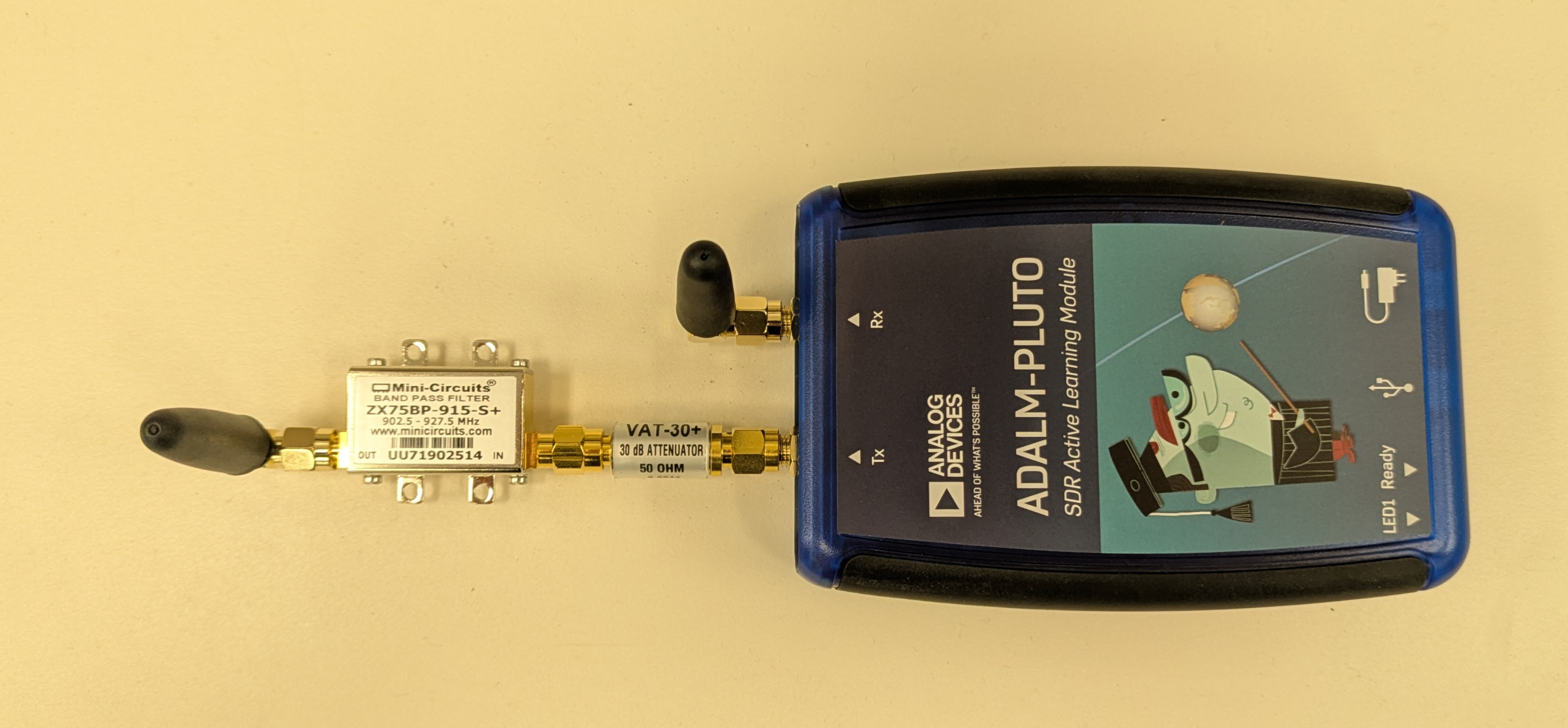
Configure the remaining SDRs for over-the-air (OTA) operation with antennas connected to their transmit and receive ports. Because the transmit and receive antennas of an SDR are located close together, we recommend inserting an inline 30 dB SMA attenuator before the transmit antenna to prevent receiver saturation.
To ensure students do not cause out-of-band interference to surrounding wireless systems, it is also good practice to insert a band-pass filter before each transmit antenna—such as the Mini-Circuits ZX75BP-915-S+ on DigiKey or 915 MHz SMA band-pass filters on Amazon for the 902–928 MHz ISM band.
Sizing Your SDR Pool
A simple back-of-the-envelope calculation illustrates how few SDRs are needed to serve a university course when hardware is accessible 24/7:
- Consider a class of 30 students assigned a 5-hour lab exercise each week (requiring 150 total device-hours per week).
- Since there are 168 hours in a week, a single SDR could theoretically serve all 30 students at 89% utilization—though that leaves little margin for overlapping schedules or deadline rushes.
- With 4 shared SDRs, average utilization drops to ~22%, giving students plenty of scheduling flexibility throughout the week.
Based on our observations across multiple academic terms, the table below provides recommended SDR counts by class enrollment. Because students typically begin each lab on the loopback SDRs and return to them when debugging, allocating 2–4 loopback units alongside your OTA pool helps avoid bottlenecks.
| Number of Students | Loopback SDRs | Over-the-Air SDRs | Total Number of SDRs |
|---|---|---|---|
| 10 students | 2 | 2 | 4 |
| 25 students | 2 | 4 | 6 |
| 40 students | 2 | 5 | 7 |
| 60 students | 2 – 3 | 3 – 6 | 5 – 9 |
| 80 students | 3 | 7 | 10 |
| 100+ students | 4 | 8+ | 12+ |
Scaling Across Rooms & Buildings with Edge Hosts
In a basic classroom deployment, all SDRs plug directly into the RemoteRF server via USB. When your curriculum includes long-distance propagation, non-line-of-sight (NLOS) multipath, or outdoor links where transmitters and receivers must be separated by hundreds of feet, you can attach SDRs to lightweight RemoteRF Hosts (such as Raspberry Pi 4/5 nodes running remoterf-host).
Each host connects back to your central remoterf-server over campus Wi-Fi, Ethernet LAN, or VPN. From a student’s perspective, reserving and calling a rooftop or hallway host-attached SDR in Python is identical to using a radio plugged directly into the server. See the Host Deployment Guide for setup instructions.