ADALM-PLUTO Guide
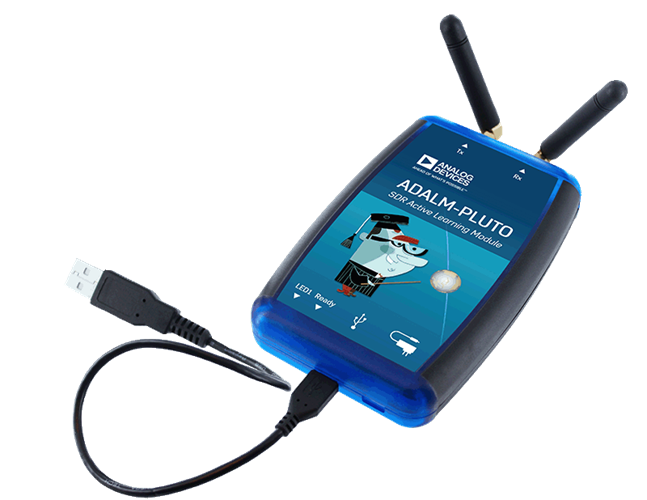
RemoteRF supports the ADALM-PLUTO (Pluto SDR), a popular software-defined radio manufactured by Analog Devices. Built around the AD9363 RF Agile Transceiver, it provides independent receive and transmit channels operating from 325 MHz to 3.8 GHz with sampling rates up to 61 MSPS. This guide covers how to initialize, configure, and stream baseband signals with a reserved Pluto SDR through RemoteRF using Python.
Device Initialization
To interface with an ADALM-PLUTO through RemoteRF, import the device driver from the remoterf library and initialize a pluto object with the token issued upon making your reservation.
This token is used by the RemoteRF platform to validate your reservation and route subsequent interfacing to the correct Pluto SDR corresponding to that reservation.
from remoterf.drivers.adalm_pluto import *
pluto = adi.Pluto(token='dUx6lG3I9lA') # token issued when making a reservation
Once initialized, the rest of your Python script follows standard Pluto SDR usage, exactly as if connected locally via USB.
Example Script
The Python script below demonstrates how to configure a Pluto SDR and then transmit and receive signals with it via the RemoteRF platform.
In this example, a complex sinusoid at 100 kHz is generated in Python and then sent to the Pluto SDR to transmit via pluto.tx().
The complex sinusoid is upconverted to a carrier frequency of 915 MHz and then transmitted out of the transmit port of the Pluto SDR.
Since the transmit buffer of the Pluto SDR is set to be cyclic in this case (tx_cyclic_buffer = True), the Pluto SDR will continue transmitting indefinitely.
The command pluto.rx() then fetches complex baseband samples received by the Pluto SDR.
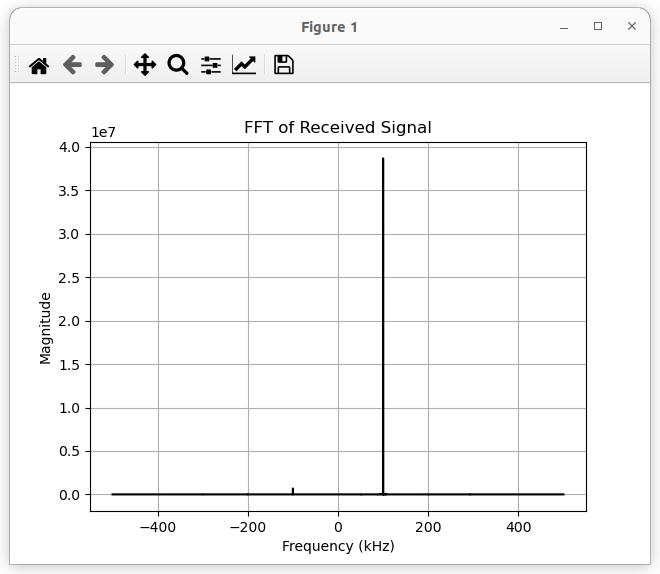
The FFT of these received samples is then plotted, showing a peak at 100 kHz as we would hope, since we are simply receiving the 100 kHz baseband signal we transmitted.
Note that the device initialization lines described above have already been included in the code below. You should not need to change any of the code below except for the token you received upon making a reservation.
import numpy as np
import matplotlib.pyplot as plt

# token provided when making reservation
TOKEN = "dUx6lG3I9lA"

# the below code can also be used to ensure you have the most
# up-to-date drivers pulled from the RemoteRF server
# from remoterf.drivers import ensure_driver
# ensure_driver(token=TOKEN)

# for interfacing with Pluto through RemoteRF
from remoterf.drivers.adalm_pluto import *

# ---------------------------------------------------------------
# Digital communication system parameters.
# ---------------------------------------------------------------
fs = 1e6     # baseband sampling rate (samples per second)
ts = 1 / fs  # baseband sampling period (seconds per sample)
sps = 10     # samples per data symbol
T = ts * sps # time between data symbols (seconds per symbol)

# ---------------------------------------------------------------
# Pluto system parameters.
# ---------------------------------------------------------------
sample_rate = fs                # sampling rate, between ~600e3 and 61e6
tx_carrier_freq_Hz = 915e6      # transmit carrier frequency, between 325 MHz to 3.8 GHz
rx_carrier_freq_Hz = 915e6      # receive carrier frequency, between 325 MHz to 3.8 GHz
tx_rf_bw_Hz = sample_rate * 2   # transmitter's RF bandwidth, between 200 kHz and 56 MHz
rx_rf_bw_Hz = sample_rate * 2   # receiver's RF bandwidth, between 200 kHz and 56 MHz
tx_gain_dB = -25                # transmit gain (in dB), between -89.75 and 0 dB with a resolution of 0.25 dB
rx_gain_dB = 40                 # receive gain (in dB), between 0 and 74.5 dB (only set if AGC is 'manual')
rx_agc_mode = 'manual'          # receiver's AGC mode: 'manual', 'slow_attack', or 'fast_attack'
rx_buffer_size = 100e3          # receiver's buffer size (in samples), length of data returned by pluto.rx()
tx_cyclic_buffer = True         # cyclic nature of transmitter's buffer (True -> continuously repeat transmission)

# ---------------------------------------------------------------
# Initialize Pluto object using issued token.
# ---------------------------------------------------------------
pluto = adi.Pluto(token=TOKEN) # create Pluto object
pluto.sample_rate = int(sample_rate)   # set baseband sampling rate of Pluto

# ---------------------------------------------------------------
# Setup Pluto's transmitter.
# ---------------------------------------------------------------
pluto.tx_destroy_buffer()                   # reset transmit data buffer to be safe
pluto.tx_rf_bandwidth = int(tx_rf_bw_Hz)    # set transmitter RF bandwidth
pluto.tx_lo = int(tx_carrier_freq_Hz)       # set carrier frequency for transmission
pluto.tx_hardwaregain_chan0 = tx_gain_dB    # set the transmit gain
pluto.tx_cyclic_buffer = tx_cyclic_buffer   # set the cyclic nature of the transmit buffer

# ---------------------------------------------------------------
# Setup Pluto's receiver.
# ---------------------------------------------------------------
pluto.rx_destroy_buffer()                   # reset receive data buffer to be safe
pluto.rx_lo = int(rx_carrier_freq_Hz)       # set carrier frequency for reception
pluto.rx_rf_bandwidth = int(rx_rf_bw_Hz)    # set receiver RF bandwidth
pluto.rx_buffer_size = int(rx_buffer_size)  # set buffer size of receiver
pluto.gain_control_mode_chan0 = rx_agc_mode # set gain control mode
pluto.rx_hardwaregain_chan0 = rx_gain_dB    # set gain of receiver

# ---------------------------------------------------------------
# Create transmit signal.
# ---------------------------------------------------------------
N = 10000 # number of samples to transmit
t = np.arange(N) / sample_rate # time vector
tx_signal = 0.5*np.exp(2.0j*np.pi*100e3*t) # complex sinusoid at 100 kHz

# ---------------------------------------------------------------
# Transmit from Pluto!
# ---------------------------------------------------------------
tx_signal_scaled = tx_signal / np.max(np.abs(tx_signal)) * (2**14 - 1) # Pluto expects TX samples between -2^14 and +2^14-1
pluto.tx(tx_signal_scaled) # will continuously transmit when cyclic buffer set to True

# ---------------------------------------------------------------
# Receive with Pluto!
# ---------------------------------------------------------------
pluto.rx_destroy_buffer() # reset receive data buffer to be safe
for i in range(1): # clear buffer to be safe
    rx_data_ = pluto.rx() # toss them out

rx_signal = pluto.rx() # capture raw samples from Pluto

# ---------------------------------------------------------------
# Clean up buffers once done receiving.
# ---------------------------------------------------------------
pluto.tx_destroy_buffer() # reset transmit data buffer to be safe
pluto.rx_destroy_buffer() # reset receive data buffer to be safe

# ---------------------------------------------------------------
# Take FFT of received signal.
# ---------------------------------------------------------------
rx_fft = np.abs(np.fft.fftshift(np.fft.fft(rx_signal)))
f = np.linspace(sample_rate/-2, sample_rate/2, len(rx_fft))

plt.figure()
plt.plot(f/1e3,rx_fft,color="black")
plt.xlabel("Frequency (kHz)")
plt.ylabel("Magnitude")
plt.title('FFT of Received Signal')
plt.grid(True)
plt.show()
Sample output upon running the above script is shown below. A peak is visible at 100 kHz, indicative of the transmitted complex exponential with frequency 100 kHz.
Properties and Methods
When interacting with an ADALM-PLUTO through RemoteRF, client scripts communicate with a pluto object generated dynamically from RemoteRF’s built-in adalm_pluto schema. This interface exposes a curated, schema-exposed subset of pyadi-iio over the remote RPC connection.
Properties
| Property | Type | Access | Range / Options | Description |
|---|---|---|---|---|
sample_rate |
int |
Read / Write | 600 kHz to 61.44 MHz | Baseband sampling rate in samples per second (complex IQ). |
rx_lo |
int |
Read / Write | 325 MHz to 3.8 GHz | Receive local oscillator (LO) center frequency in Hz. |
tx_lo |
int |
Read / Write | 325 MHz to 3.8 GHz | Transmit local oscillator (LO) center frequency in Hz. |
rx_rf_bandwidth |
int |
Read / Write | 200 kHz to 56 MHz | Receive analog baseband low-pass filter cutoff / RF bandwidth in Hz. |
tx_rf_bandwidth |
int |
Read / Write | 200 kHz to 56 MHz | Transmit analog baseband low-pass filter cutoff / RF bandwidth in Hz. |
rx_hardwaregain_ |
float |
Read / Write | 0 to 74.5 dB | RX channel 0 analog frontend gain in dB (when AGC is 'manual'). |
tx_hardwaregain_ |
float |
Read / Write | −89.75 to 0.0 dB | TX channel 0 attenuation/gain setting in dB (0.25 dB steps). |
gain_control_mode_ |
str |
Read / Write | 'manual', 'slow_attack', 'fast_attack', 'hybrid' |
RX channel 0 gain control mode. |
rx_buffer_size |
int |
Read / Write | Positive integer | Number of complex samples captured per receive buffer (pluto.rx()). |
tx_cyclic_buffer |
bool |
Read / Write | True, False |
Controls cyclic (repeating) buffer mode for continuous transmit operations. |
rx_enabled_channels |
list[int] |
Read / Write | e.g., [0] |
List of enabled receive channels ([0] for single-channel reception). |
tx_enabled_channels |
list[int] |
Read / Write | e.g., [0] |
List of enabled transmit channels ([0] for single-channel transmission). |
dds_enabled |
bool |
Read / Write | True, False |
Controls whether the internal direct digital synthesis (DDS) tone generator is enabled. |
dds_frequencies |
list[int] |
Read / Write | Output frequency in Hz | Output frequency settings for the DDS channels in Hz. |
dds_phases |
list[int] |
Read / Write | 0 to 360000 | Phase settings for the DDS channels in millidegrees. |
dds_scales |
list[float] |
Read / Write | 0.0 to 1.0 | Scale/amplitude factors for the DDS channels. |
filter |
str |
Read / Write | Valid filter file path | Path to an AD936x digital filter configuration file or filter configuration profile. |
loopback |
int |
Read / Write | 0 (disabled), 1 (digital), 2 (RF) | Digital/RF loopback mode setting for self-testing. |
rates |
list[int] |
Read-only | Filter rates in Hz | Decimation and interpolation filter rates reported by the FPGA filter block. |
repr |
str |
Read-only | Diagnostic string | Diagnostic string representation (repr()) of the underlying device driver object. |
rx_annotated |
bool |
Read / Write | True, False |
Flag indicating whether received buffers include sample metadata/annotations. |
rx_channel_names |
list[str] |
Read-only | e.g., ['voltage0'] |
Available receive channel identifier names. |
rx_dec8_filter_en |
bool |
Read / Write | True, False |
Controls the FPGA decimate-by-8 filter block. |
rx_output_type |
str |
Read / Write | 'raw', 'compatible' |
Data format representation for received samples (raw integers vs. normalized complex). |
tx_channel_names |
list[str] |
Read-only | e.g., ['voltage0'] |
Available transmit channel identifier names. |
tx_int8_filter_en |
bool |
Read / Write | True, False |
Controls the FPGA interpolate-by-8 filter block. |
Methods
| Method | Arguments | Returns | Description |
|---|---|---|---|
pluto.rx() |
None | numpy.ndarray (complex) |
Fetches a buffer of complex IQ samples from enabled receive channels. Sample values range from −2048 to +2047 (12-bit ADC). Clipping at ±2048 indicates ADC saturation. |
pluto.tx(value) |
value (array-like, complex) |
None |
Submits complex IQ samples to the transmit hardware. Both real and imaginary components must fall strictly between −214 and +214−1 (−16,384 to +16,383) to match the 14-bit DAC range. |
pluto.rx_destroy_buffer() |
None | None |
Frees and flushes the hardware receive capture buffer. |
pluto.tx_destroy_buffer() |
None | None |
Deallocates and cancels active hardware transmit buffers. |
pluto.ip() |
None | str |
Queries and returns the network connection identifier or verifies device IP connectivity. |
pluto.dds_single_tone( |
frequency (int), scale (float), channel (int, optional) |
None |
Generates a single complex continuous-wave DDS tone on the designated TX channel. |
pluto.dds_dual_tone( |
frequency1 (int), scale1 (float), frequency2 (int), scale2 (float), channel (int, optional) |
None |
Generates two complex DDS tones simultaneously on the designated TX channel. |
pluto.disable_dds() |
None | None |
Disables the internal DDS signal generator and halts tone transmission. |
Tips and Tricks
Common Configuration Template
For quick reference, the following template brings together the most commonly configured RF, filter, buffer, and gain properties for a Pluto SDR session:
# Common Pluto SDR Configuration Template
pluto.sample_rate = int(1e6)              # sampling rate, between ~600 kHz and 61.44 MHz
pluto.tx_rf_bandwidth = int(2e6)          # transmitter's RF bandwidth, between 200 kHz and 56 MHz
pluto.tx_lo = int(915e6)                  # transmit carrier frequency, between 325 MHz to 3.8 GHz
pluto.tx_hardwaregain_chan0 = -25         # transmit gain (in dB), between -89.75 and 0 dB with a resolution of 0.25 dB
pluto.tx_cyclic_buffer = True             # cyclic nature of transmitter's buffer (True -> continuously repeat transmission)
pluto.rx_lo = int(915e6)                  # receive carrier frequency, between 325 MHz to 3.8 GHz
pluto.rx_rf_bandwidth = int(2e6)          # receiver's RF bandwidth, between 200 kHz and 56 MHz
pluto.rx_buffer_size = int(100e3)         # receiver's buffer size (in samples), length of data returned by pluto.rx()
pluto.gain_control_mode_chan0 = 'manual'  # receiver's AGC mode: 'manual', 'slow_attack', or 'fast_attack'
pluto.rx_hardwaregain_chan0 = 40          # receive gain (in dB), between 0 and 74.5 dB (only set if AGC is 'manual')
Use Complex Signals
The Pluto SDR expects all baseband signals to be complex and may not function properly if this is not the case. As such, you may run into problems if you try to transmit and receive one-dimensional signals, like BPSK signals, M-PAM signals, or real-valued sinusoids. Thus, it is advised to transmit complex signals like QPSK signals, QAM signals, and complex sinusoids.
Scaling Your Transmit Signal
Pluto’s 14-bit DAC expects the real and imaginary components of transmitted baseband signals to range from -2^14 to +2^14-1 (-16,384 to +16,383). As such, you should scale your transmit signal to occupy these bounds. To do so while maximizing the dynamic range of your digital-to-analog converters (DACs), you can use the following lines.
tx_signal_scaled = tx_signal / np.max(np.abs(tx_signal)) * (2**14 - 1)
pluto.tx(tx_signal_scaled)
Scale of Receive Signals
Received samples from the Pluto’s 12-bit ADC will range from -2048 to +2047. If you see your signals clipping around these values, you are saturating your receiver’s analog-to-digital converters (ADCs). In other words, the signal(s) entering the ADCs are too strong for the ADCs’ input range. You should decrease your receive gain and/or transmit gain in order to prevent this from happening.
Receive Gain Control
The Pluto has three options for receive gain control: manual, slow_attack, and fast_attack.
The latter two are forms of automatic gain control (AGC), which automatically adjusts the gain of the receiver’s front-end based on the strength of the received signal.
With manual, the gain of the receiver is fixed according to pluto.rx_hardwaregain_chan0 = rx_gain_dB.
Flushing the Receive Buffer
This is not always absolutely necessary, but it can sometimes be helpful to flush the receive buffer of the Pluto SDR before receiving a desired signal.
To do this, destroy the receive buffer with pluto.rx_destroy_buffer() and then call pluto.rx() at least once before receiving the desired signal.
pluto.rx_destroy_buffer() # reset receive data buffer to be safe
for i in range(1): # clear buffer to be safe
    rx_data_ = pluto.rx() # toss them out
Connecting to Multiple Pluto SDRs at Once
In some cases, a single Pluto SDR is sufficient to conduct basic experiments.
For more involved experiments, one may wish to use multiple Pluto SDRs, such as for transmitting from one Pluto SDR to another.
To accomplish this, all one needs to do is create multiple adi.Pluto() objects.
As a simple example, separate transmit and receive objects can be created as follows.
pluto_tx = adi.Pluto(token='dUx6lG3I9lA') # create TX
pluto_rx = adi.Pluto(token='ajBMv80jMog') # create RX
Here, the token dUx6lG3I9lA corresponds to the particular device that was reserved when that token was issued, and ajBMv80jMog analogously.
Destroying the Transmit and Receive Buffers
When tx_cyclic_buffer = True is used, the Pluto SDR loads the transmit waveform into onboard hardware memory and continues repeating transmission over the air indefinitely. This transmission persists even after your Python script finishes executing, until the hardware buffer is destroyed or your reservation expires.
To ensure the Pluto SDR does not continually transmit when it is not in use and to avoid emitting unwanted RF energy in the lab, always destroy the transmit and receive buffers at the end of your script (after the final call of pluto.rx()):
pluto.tx_destroy_buffer() # reset transmit data buffer to be safe
pluto.rx_destroy_buffer() # reset receive data buffer to be safe
If separate Pluto SDRs are being used for transmission and reception, then use the following:
pluto_tx.tx_destroy_buffer() # reset transmit data buffer to be safe
pluto_tx.rx_destroy_buffer() # reset receive data buffer to be safe
pluto_rx.tx_destroy_buffer() # reset transmit data buffer to be safe
pluto_rx.rx_destroy_buffer() # reset receive data buffer to be safe
Detailed Block Diagram of Pluto’s RFIC
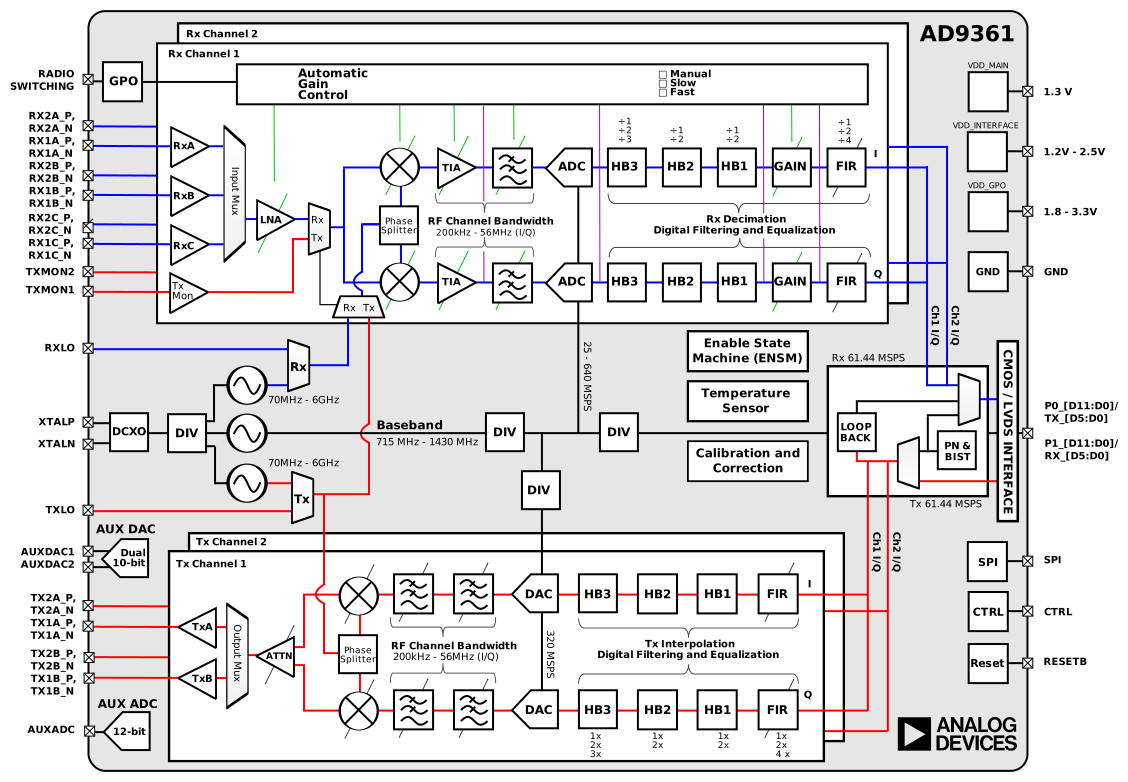
A detailed functional block diagram of the AD936x transceiver architecture (AD9363 / AD9361), used in the Pluto SDR, is shown below for reference.