Example Usage with ADALM-PLUTO
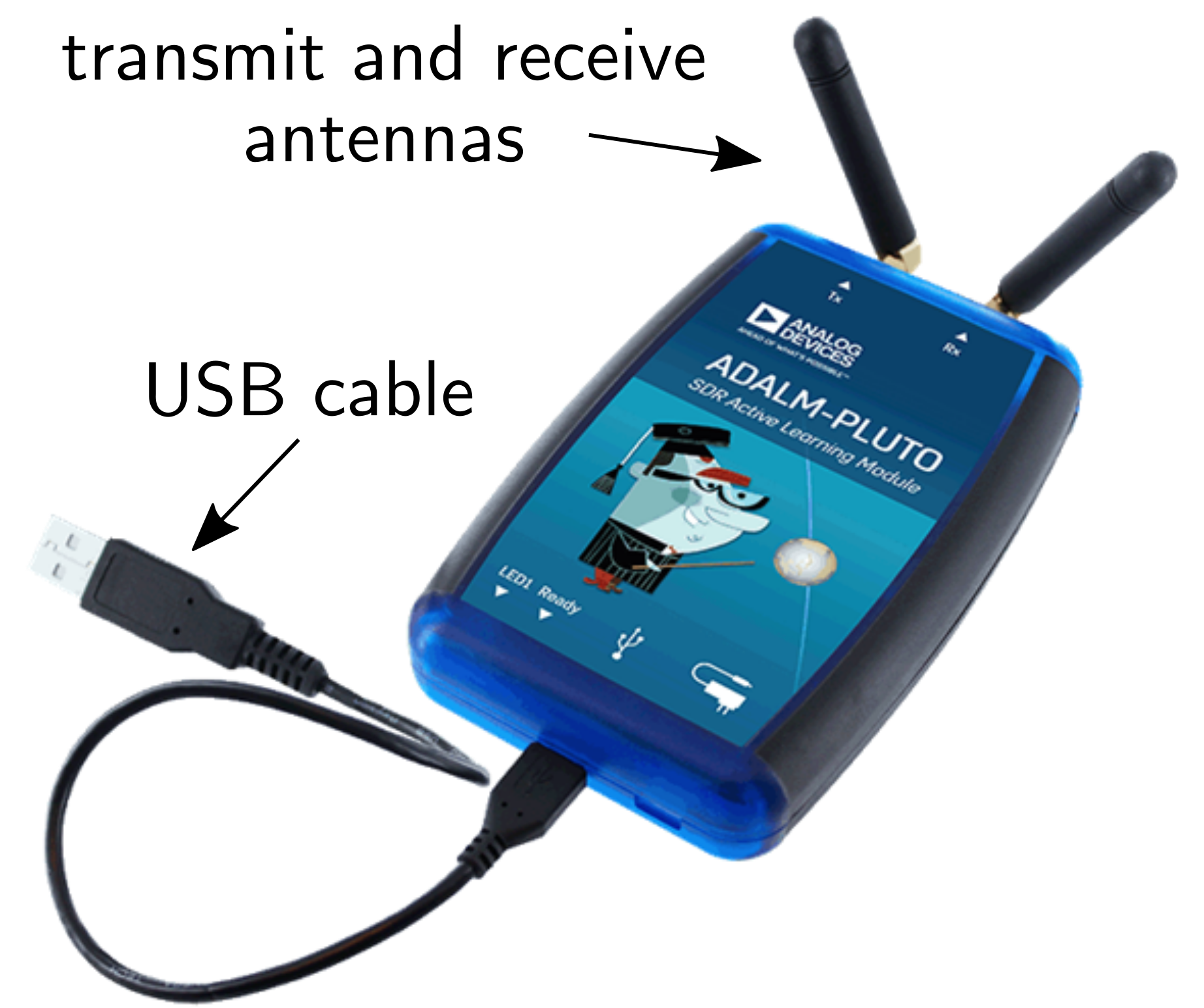
Now that we have walked through how to make a reservation and obtain permission (via the issued token) to access a particular SDR at a particular time, let us now go through the necessary steps to actually interface with that SDR via Python. To do so, we will assume the RemoteRF server has connected to it a Pluto SDR.
Two Line Changes — That’s It!
In creating the RemoteRF platform, our goal was to make it as seamless as possible to convert a traditional Python script that was written for locally interfacing with an SDR into one which can be used to remotely interface with one via the RemoteRF platform. In this vein, we have made it such that using the RemoteRF platform requires only two line changes, compared to a traditional Python script that locally interfaces with a Pluto SDR.
To illustrate this, below shows what a traditional Python script starts off with in order to connect to a Pluto SDR which is connected directly to one’s computer via USB.
# for locally interfacing with Pluto via its IP address
import adi
sdr = adi.Pluto("ip:192.168.2.1")
In contrast, these two lines should be updated to the following when remotely interfacing with a Pluto SDR via RemoteRF.
Notice that the token issued upon making a reservation should be inserted when calling adi.Pluto().
This token is used by the RemoteRF platform to validate a user’s reservation and to route subsequent interfacing to the correct Pluto SDR corresponding to that reservation.
# for interfacing with Pluto through RemoteRF
from remoteRF.drivers.adalm_pluto import *
sdr = adi.Pluto(token='dUx6lG3I9lA') # token issued when making a reservation
After these two lines, the rest of a user’s Python script would follow exactly as if they were connected locally to a Pluto SDR via USB. This means they can rely on all existing documentation for the Pluto SDR, with the exception of the two line changes mentioned before. Let us thus walk through creating a user’s first Pluto script in Python.
Hello World Example
As a first step, save the below Python script as main_my_first_script.py or something similar.
Then, in a new terminal window/tab, run this script via the following.
python main_my_first_script.pyIf that does not work, try the following instead.
python3 main_my_first_script.pyThe below Python script serves as a useful example demonstrating how to configure a Pluto SDR and then transmit and receive signals with it via the RemoteRF platform.
In this example, a complex sinusoid at 100 kHz is generated in Python and then sent to the Pluto SDR to transmit via sdr.tx().
The complex sinusoid is upconverted to a carrier frequency of 915 MHz and then transmitted out of the transmit port of the Pluto SDR.
Since the transmit buffer of the Pluto SDR is set to be cyclic in this case (tx_cyclic_buffer = True), the Pluto SDR will continue transmitting indefinitely.
The command sdr.rx() then fetches complex baseband samples received by the Pluto SDR.
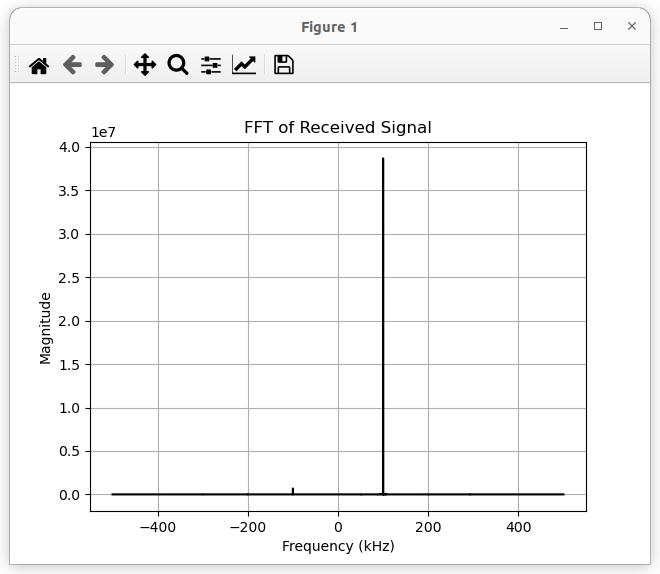
The FFT of these received samples are then plotted, showing a peak at 100 kHz as we would hope, since we are simply receiving the 100 kHz baseband signal we transmitted.
Note that the two lines described in the previous step—which import our custom library and initialize an sdr object—have already been included in the code below.
You should not need to change any of the code below except for the token you received upon making a reservation.
import numpy as np
import matplotlib.pyplot as plt

# token provided when making reservation
TOKEN = "dUx6lG3I9lA"

# the below code can also be used to ensure you have the most
# up-to-date drivers pulled from the RemoteRF server
# from remoterf.drivers import ensure_driver
# ensure_driver(token=TOKEN)

# for interfacing with Pluto through RemoteRF
from remoterf.drivers.adalm_pluto import *

# ---------------------------------------------------------------
# Digital communication system parameters.
# ---------------------------------------------------------------
fs = 1e6     # baseband sampling rate (samples per second)
ts = 1 / fs  # baseband sampling period (seconds per sample)
sps = 10     # samples per data symbol
T = ts * sps # time between data symbols (seconds per symbol)

# ---------------------------------------------------------------
# Pluto system parameters.
# ---------------------------------------------------------------
sample_rate = fs                # sampling rate, between ~600e3 and 61e6
tx_carrier_freq_Hz = 915e6      # transmit carrier frequency, between 325 MHz to 3.8 GHz
rx_carrier_freq_Hz = 915e6      # receive carrier frequency, between 325 MHz to 3.8 GHz
tx_rf_bw_Hz = sample_rate * 2   # transmitter's RF bandwidth, between 200 kHz and 56 MHz
rx_rf_bw_Hz = sample_rate * 2   # receiver's RF bandwidth, between 200 kHz and 56 MHz
tx_gain_dB = -25                # transmit gain (in dB), between -89.75 and 0 dB with a resolution of 0.25 dB
rx_gain_dB = 40                 # receive gain (in dB), between 0 and 74.5 dB (only set if AGC is 'manual')
rx_agc_mode = 'manual'          # receiver's AGC mode: 'manual', 'slow_attack', or 'fast_attack'
rx_buffer_size = 100e3          # receiver's buffer size (in samples), length of data returned by sdr.rx()
tx_cyclic_buffer = True         # cyclic nature of transmitter's buffer (True -> continuously repeat transmission)

# ---------------------------------------------------------------
# Initialize Pluto object using issued token.
# ---------------------------------------------------------------
sdr = adi.Pluto(token=TOKEN) # create Pluto object
sdr.sample_rate = int(sample_rate)   # set baseband sampling rate of Pluto

# ---------------------------------------------------------------
# Setup Pluto's transmitter.
# ---------------------------------------------------------------
sdr.tx_destroy_buffer()                   # reset transmit data buffer to be safe
sdr.tx_rf_bandwidth = int(tx_rf_bw_Hz)    # set transmitter RF bandwidth
sdr.tx_lo = int(tx_carrier_freq_Hz)       # set carrier frequency for transmission
sdr.tx_hardwaregain_chan0 = tx_gain_dB    # set the transmit gain
sdr.tx_cyclic_buffer = tx_cyclic_buffer   # set the cyclic nature of the transmit buffer

# ---------------------------------------------------------------
# Setup Pluto's receiver.
# ---------------------------------------------------------------
sdr.rx_destroy_buffer()                   # reset receive data buffer to be safe
sdr.rx_lo = int(rx_carrier_freq_Hz)       # set carrier frequency for reception
sdr.rx_rf_bandwidth = int(sample_rate)    # set receiver RF bandwidth
sdr.rx_buffer_size = int(rx_buffer_size)  # set buffer size of receiver
sdr.gain_control_mode_chan0 = rx_agc_mode # set gain control mode
sdr.rx_hardwaregain_chan0 = rx_gain_dB    # set gain of receiver

# ---------------------------------------------------------------
# Create transmit signal.
# ---------------------------------------------------------------
N = 10000 # number of samples to transmit
t = np.arange(N) / sample_rate # time vector
tx_signal = 0.5*np.exp(2.0j*np.pi*100e3*t) # complex sinusoid at 100 kHz

# ---------------------------------------------------------------
# Transmit from Pluto!
# ---------------------------------------------------------------
tx_signal_scaled = tx_signal / np.max(np.abs(tx_signal)) * (2**14 - 1) # Pluto expects TX samples to be between -2^14 and 2^14
sdr.tx(tx_signal_scaled) # will continuously transmit when cyclic buffer set to True

# ---------------------------------------------------------------
# Receive with Pluto!
# ---------------------------------------------------------------
sdr.rx_destroy_buffer() # reset receive data buffer to be safe
for i in range(1): # clear buffer to be safe
    rx_data_ = sdr.rx() # toss them out

rx_signal = sdr.rx() # capture raw samples from Pluto

# ---------------------------------------------------------------
# Clean up buffers once done receiving.
# ---------------------------------------------------------------
sdr.tx_destroy_buffer() # reset transmit data buffer to be safe
sdr.rx_destroy_buffer() # reset receive data buffer to be safe

# ---------------------------------------------------------------
# Take FFT of received signal.
# ---------------------------------------------------------------
rx_fft = np.abs(np.fft.fftshift(np.fft.fft(rx_signal)))
f = np.linspace(sample_rate/-2, sample_rate/2, len(rx_fft))

plt.figure()
plt.plot(f/1e3,rx_fft,color="black")
plt.xlabel("Frequency (kHz)")
plt.ylabel("Magnitude")
plt.title('FFT of Received Signal')
plt.grid(True)
plt.show()
Sample output upon running the above script is shown below. A peak is visible at 100 kHz, indicative of the transmitted complex exponential with frequency 100 kHz.
A Few Tips Regarding the Pluto SDR
Use Complex Signals
The Pluto SDR expects all baseband signals to be complex and may not function properly if this is not the case. As such, you may run into problems if you try to transmit and receive one-dimensional signals, like BPSK signals, M-PAM signals, or real-valued sinusoids. Thus, it is advised to transmit complex signals like QPSK signals, QAM signals, and complex sinusoids.
Scaling Your Transmit Signal
As mentioned in the comments of the example code above, Pluto expects the real and imaginary components of transmitted signals to range from -2^14 to +2^14-1. As such, you should scale your transmit signal to occupy these bounds. To do so while maximizing the dynamic range of your digital-to-analog converters (DACs), you can use the following lines.
tx_signal_scaled = tx_signal / np.max(np.abs(tx_signal)) * (2**14 - 1)
sdr.tx(tx_signal_scaled)
Scale of Receive Signals
Received samples from Pluto will range from -2048 to 2047. If you see your signals clipping around these values, you are probably saturating your receiver’s analog-to-digital converters (ADCs). In other words, the signal(s) entering the ADCs are too strong for the ADCs’ input range. You should decrease your receive gain and/or transmit gain in order to prevent this from happening.
Receive Gain Control
The Pluto has three options for receive gain control: manual, slow_attack, and fast_attack.
The latter two are forms of automatic gain control (AGC), which automatically adjusts the gain of the receiver’s front-end based on the strength of the received signal.
With manual, the gain of the receiver is fixed according to sdr.rx_hardwaregain_chan0 = rx_gain_dB.
Flushing the Receive Buffer
This is not always absolutely necessary, but it can sometimes be helpful to flush the receive buffer of the Pluto SDR before receiving a desired signal.
To do this, destroy the receive buffer with sdr.rx_destroy_buffer() and then call sdr.rx() at least once before receiving the desired signal.
sdr.rx_destroy_buffer() # reset receive data buffer to be safe
for i in range(1): # clear buffer to be safe
    rx_data_ = sdr.rx() # toss them out
Connecting to Multiple Pluto SDRs at Once
In some cases, a single Pluto SDR is sufficient to conduct basic experiments.
For more involved experiments, one may wish to use multiple Pluto SDRs, such as for transmitting from one Pluto SDR to another.
To accomplish this, all one needs to do is create multiple adi.Pluto() objects.
As a simple example, separate transmit and receive objects can be created as follows.
sdr_tx = adi.Pluto(token='dUx6lG3I9lA') # create TX
sdr_rx = adi.Pluto(token='ajBMv80jMog') # create RX
Here, the token dUx6lG3I9lA corresponds to the particular device that was reserved when that token was issued, and ajBMv80jMog analogously.
Destroying the Transmit and Receive Buffers
To ensure the Pluto SDR does not continually transmit when it is not in use, add the following lines after receiving any necessary signals.
In other words, these lines should be placed after the final call of sdr.rx().
sdr.tx_destroy_buffer() # reset transmit data buffer to be safe
sdr.rx_destroy_buffer() # reset receive data buffer to be safe
If separate Pluto SDRs are being used for transmission and reception, then use the following.
sdr_tx.tx_destroy_buffer() # reset transmit data buffer to be safe
sdr_tx.rx_destroy_buffer() # reset receive data buffer to be safe
sdr_rx.tx_destroy_buffer() # reset transmit data buffer to be safe
sdr_rx.rx_destroy_buffer() # reset receive data buffer to be safe
Detailed Block Diagram of Pluto’s RFIC
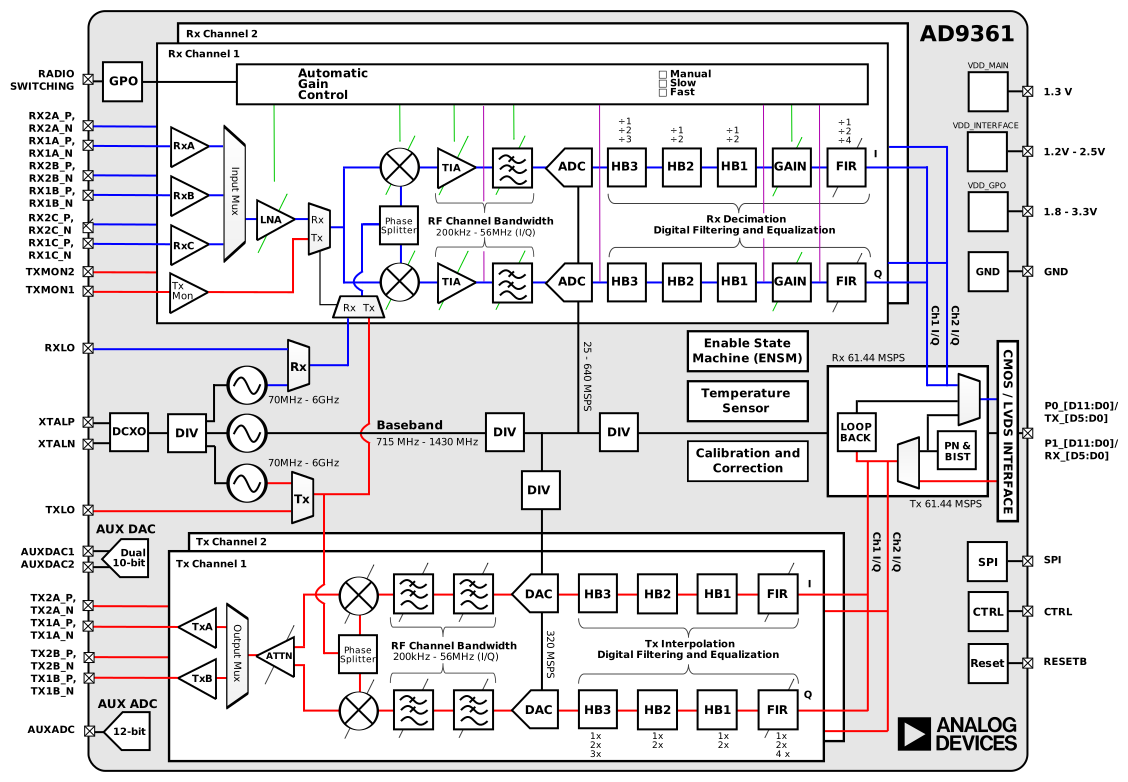
A detailed block diagram of the AD9361 RFIC, used in the Pluto SDR, is shown below for reference.