
Server Documentation
This page provides documentation on deploying a RemoteRF server on a college or university campus. It is intended for instructors or lab administrators who are interested in deploying RemoteRF on their campus. This documentation contains all of the necessary information for RemoteRF server deployment, operation, and managment. Documentation for the RemoteRF server is divided into the following parts:
- Part 1: Server Deployment
- Part 2: Host Deployment
- Part 3: Server Operation
- Part 4: Server Setup for Class Use
On this page, we provide an overview of the RemoteRF server, hosts, and overall architecture.
Servers, Hosts, and Clients
The RemoteRF platform consists of three distinct components, each of which runs its own specialized software:
- Server: A RemoteRF server is the central component of the RemoteRF platform. It is in charge of handling the reservation process and managing remote access to the SDRs it has connected to it. It should be connected to the campus local network and will be managed by a university instructor.
- Client: A RemoteRF client connects to the RemoteRF platform over the local network or VPN. It allows students to remotely connect to the RemoteRF server and reserve and access its SDRs. Each client should be connected to the same network as the RemoteRF server.
- Host: A RemoteRF host is used to connect one or more SDRs to the RemoteRF server over Wi-Fi, LAN, or VPN. Physically, it may be a lightweight, single-board computer, such as the Raspberry Pi, with one or more SDRs attached to it via USB. Each host should be connected to the same network as the RemoteRF server.
A typical RemoteRF deployment will have one server, many clients, and possibly a handful of hosts. Not all RemoteRF deployments will have hosts, such as those whose SDRs are directly connected to the RemoteRF server over USB.
Architecture
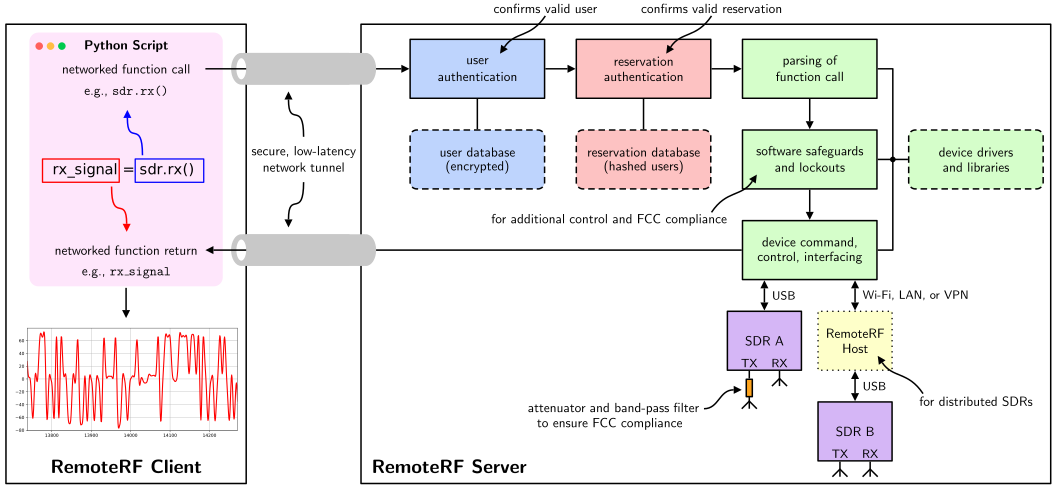
The architecture of the RemoteRF platform is depicted below in the functional block diagram. A RemoteRF client (student) connects to the RemoteRF server via a network connection. Upon running Python code on the student’s personal computer, commands involving an SDR are routed to the RemoteRF server via networked function calls. These commands then propagate through the RemoteRF server’s processing chain before executing them on the intended SDR. Any returned values (such as received samples) are piped back from the server to the client over the network, allowing the student to process them locally on their personal machine. A RemoteRF host can be used to connect SDRs to the RemoteRF server over Wi-Fi, LAN, or VPN.
University Deployment
For an instructor to deploy RemoteRF on their campus, all that is needed is to acquire one or more SDRs (perhaps a few Pluto SDRs from Analog Devices) and a Linux computer to act as the RemoteRF server. In a simple setup, the SDRs would be directly connected to the server via USB. In more involved setups, the SDRs could be geophraphically distributed around campus and then connected to the server via Wi-Fi, LAN, or VPN via RemoteRF hosts. After a streamlined software installation and initial configuration, the RemoteRF platform would be fully functional. Instructors can modify the platform’s settings or add/remove SDRs over time, as needed.
Student Usage
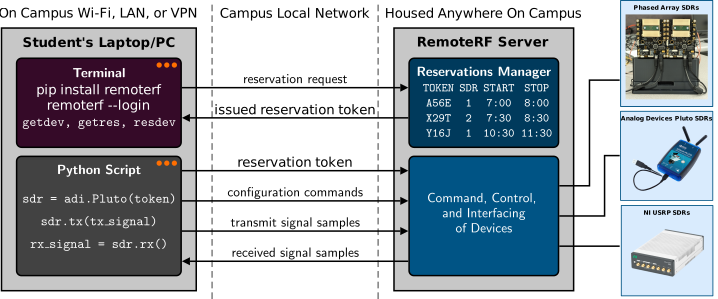
Once RemoteRF is deployed on their university campus, students would need to install the remoterf Python package, which allows them to connect to the RemoteRF server on their campus, as long as they are connected to their campus network (or VPN). After making an account on their RemoteRF server through a simple command line interface, students can immediately begin reserving access to its SDRs during desired time slots. Upon making a reservation for a particular SDR during a specific time slot, the RemoteRF server will issue a unique token (random string of characters) to the student, which grants them exclusive access to that SDR during their reservation period. This token can then be inserted into a student’s Python script, which will allow them to remotely access the SDR as if it were physically connected to their personal computer. Behind the scenes, all commands and data will be exchanged between their personal computer and the SDR over their campus network via the RemoteRF platform. Since RemoteRF is fully automated and runs continuously, students may reserve and remotely access SDRs to complete their lab exercises at any time from virtually anywhere.